


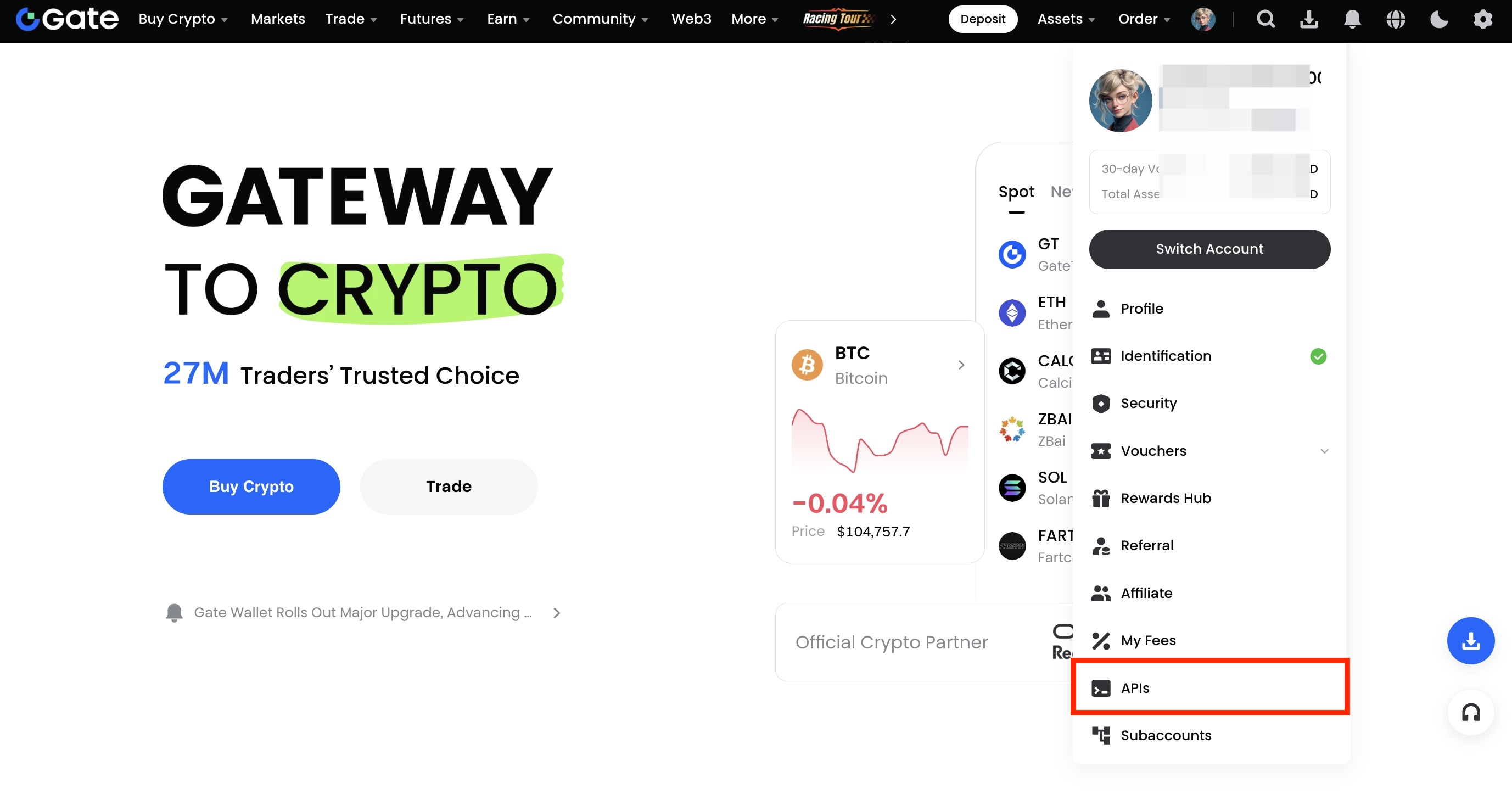
1. Ouvrez le site Web de Gate. Placez votre curseur au-dessus de l'icône du profil pour dérouler le menu et cliquez sur "API Management".
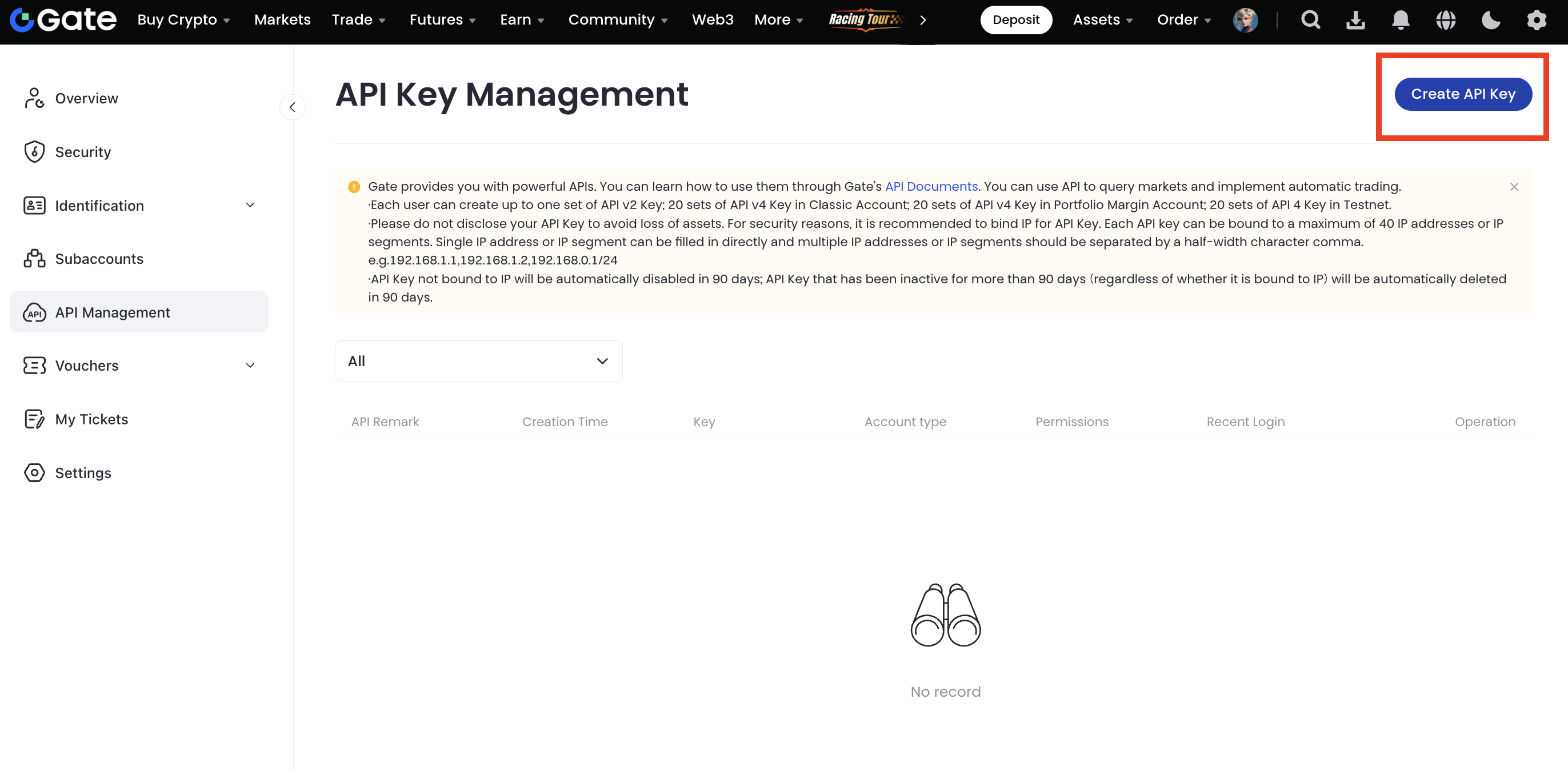
2. Cliquez sur "Créer une clé API" sur la page.
3. Créer une clé API
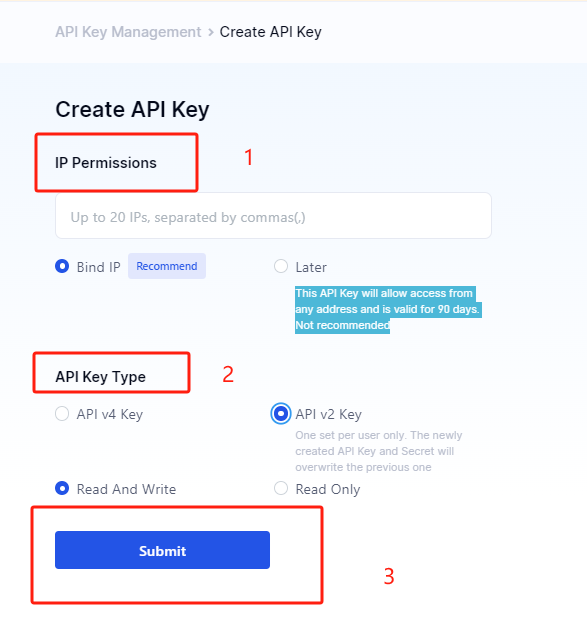
Créez une clé APIv2 :
① Permissions IP : Vous pouvez choisir de lier ou non l'IP.
Remarque : Si vous choisissez de ne pas lier l'IP, la clé API permettra l'accès à partir de n'importe quelle adresse et sera valide pendant 90 jours.
② Type de clé API : Sélectionnez la clé API v2. Chaque utilisateur ne peut créer qu'un seul jeu, et le nouveau jeu remplacera le précédent.
③ Définissez les autorisations : "Lecture et écriture" ou "Lecture seule".
④ Confirmez les détails et cliquez sur "Soumettre".
Remarque : La clé API précédente expirera immédiatement lorsqu'une nouvelle clé est générée.
Les clés API permettent d'interroger les données de compte, de trader, de retirer des fonds, etc.
Conservez vos clés API en sécurité et ne les partagez jamais avec d'autres personnes !
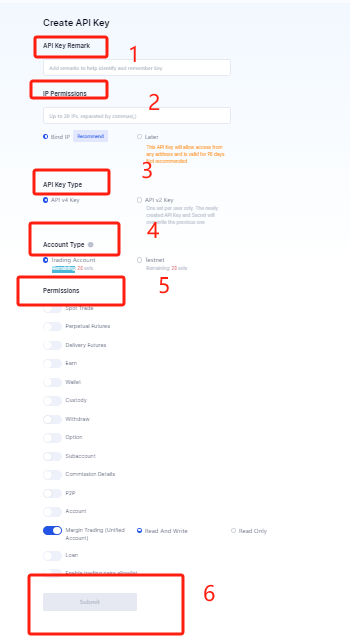
Créer une clé APIv4 :
① Remarques de la clé API : Aide à identifier la clé.
② Permissions IP : Vous pouvez choisir de lier ou non l'IP (mêmes règles que ci-dessus).
③ Type de clé API : Sélectionnez "API v4".
④ Type de compte : Choisissez "Compte classique", "Trading sur marge" ou "Testnet".
⑤ Permissions : Définissez comme "Lecture et écriture" ou "Lecture seule". Remarque : la paire de devises ne peut pas être vide.
⑥ Confirmez les détails et cliquez sur "Soumettre".
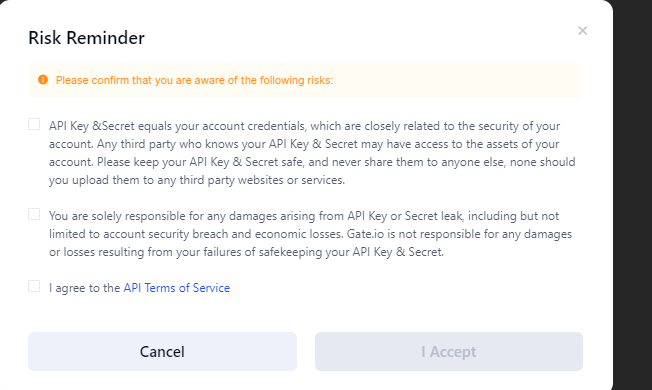
4. Un rappel de risque s'affichera après avoir cliqué sur "Soumettre". Veuillez lire attentivement les avertissements, puis cliquez sur "J'accepte" ou "Annuler" pour continuer.
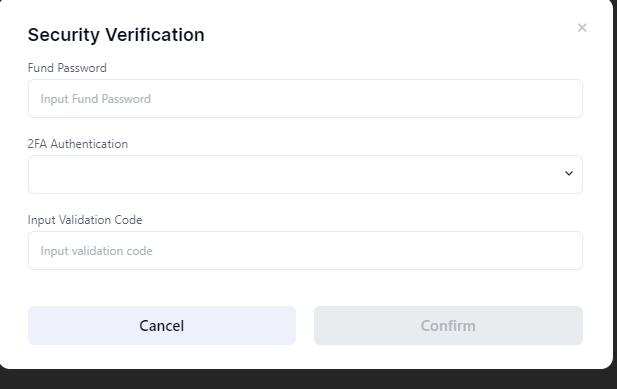
Saisissez le mot de passe du fonds, sélectionnez la méthode de double authentification (2FA), puis cliquez sur "Confirmer".
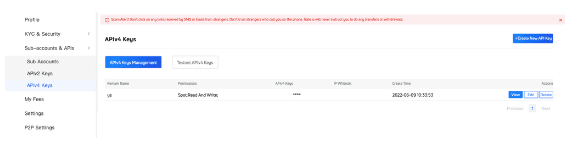
5. Une fois la clé API créée, vous pouvez la consulter, la modifier ou la supprimer.
6. Avis :
① Les clés APIv2/4 peuvent être utilisées pour le dépôt et le retrait.
Pour effectuer un retrait via API, vous devez utiliser une adresse déjà utilisée manuellement, et la dernière opération manuelle doit dater de plus de 24 heures.
② Différences entre APIv2 et APIv4 :
• Les clés APIv2 et APIv4 sont indépendantes.
• APIv2 prend uniquement en charge le trading au comptant.
• APIv4 prend en charge le trading au comptant, sur marge et sur contrat.
• Pour créer une clé APIv2, faites défiler jusqu'en bas de la page dédiée.
• Les clés APIv4 se créent dans "Centre Personnel" > "Sous-compte et API" > "Clés APIv4".
Choisissez selon vos besoins. Consultez cet article pour les mises à jour des fonctionnalités.
Si cet article ne répond pas à votre question, veuillez soumettre un ticket. Incluez les informations suivantes :
- Votre UID
- L'URL de la demande initiale
- Les paramètres utilisés et une description détaillée du problème
- Le type d'API (spot, marge, testnet/mainnet)
- Le langage de programmation (joignez du code si possible)
- Si un SDK est utilisé, décrivez son usage ou laissez un commentaire sur GitHub
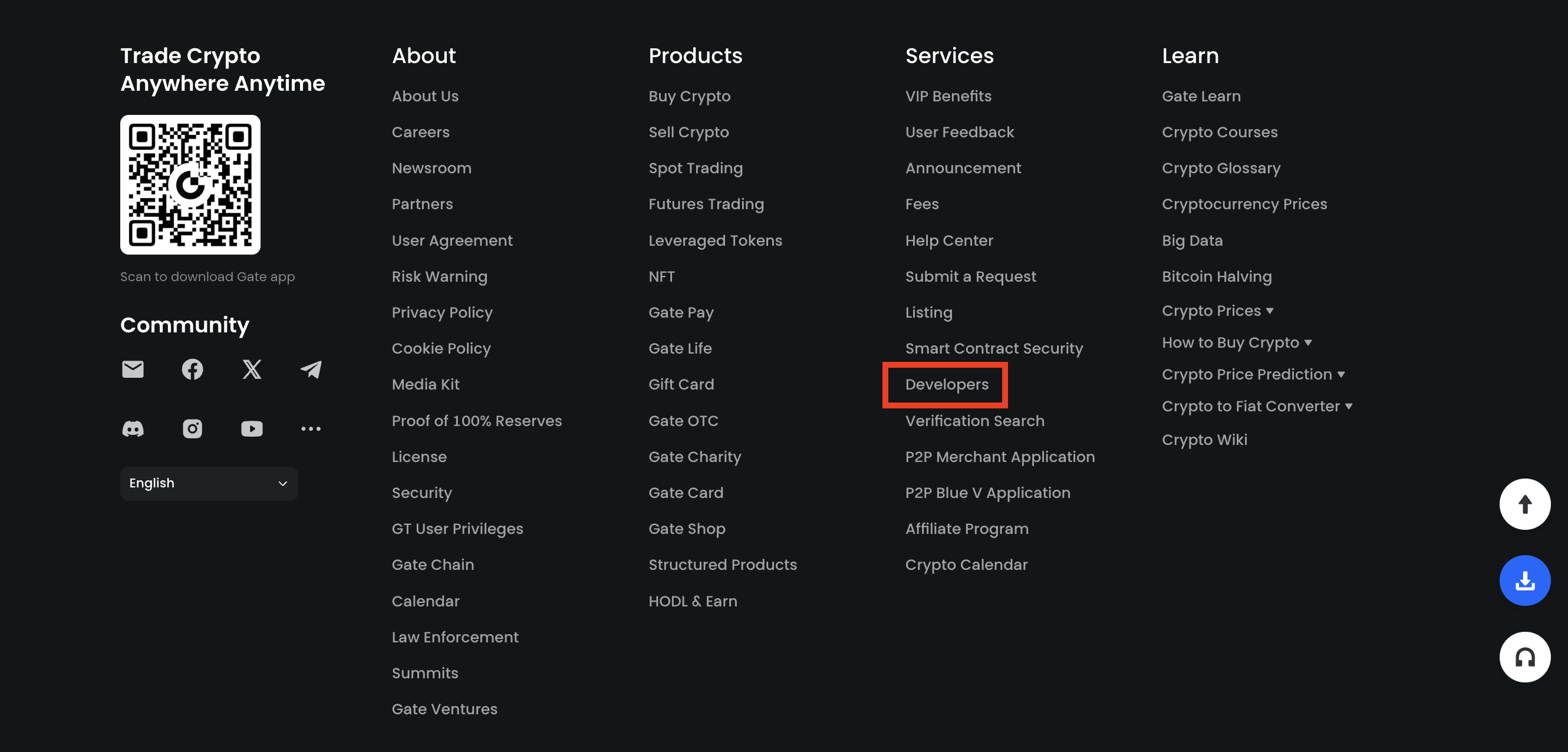
7. Les documents relatifs à l’API sont disponibles dans "Services" > "Développeurs (API)" en bas de la page.
8. Règle de limite de fréquence
| Markets | Endpoints | Limits | Based On | Include |
|---|---|---|---|---|
| All public endpoints | Public endpoints | 200r/10s per endpoint | IP | Orderbook, Candlestick, Ticker, etc. |
| Wallet | Private endpoints | Withdrawal(POST /withdrawals) : 1r/3s UID transfer(POST /withdrawals/push) 1r/10s Transfer between trading accounts (POST /wallet/transfers) 80r/10s Transfer between main and sub accounts (POST /wallet/sub_account_transfers) 80r/10s Transfer from a sub-account to another sub-account (POST /wallet/sub_account_to_sub_account) 80r/10s Retrieve user's total balances (GET /wallet/total_balance) 80r/10s Retrieve sub account balances (GET /wallet/sub_account_balances) 80r/10s Query sub accounts' margin balances (GET /wallet/sub_account_margin_balances) 80r/10s Query sub accounts' futures account balances (GET /wallet/sub_account_futures_balances) 80r/10s Query subaccount's cross_margin account info(GET /wallet/sub_account_cross_margin_balances) 80r/10s The Others: 200r/10s per endpoint |
UID | Withdrawal. Query personal account balance. Query subaccount balance. |
| Spot | Private endpoints | The rate limit for batch/single order placement and amend an order are total of 10r/s (UID+Market) The rate limit for batch/single order cancellation is total of 200r/s The Others: 200r/10s per endpoint |
UID | Spot order placement and cancellation. Trade history and fee rates. |
| Perpetual Futures | Private endpoints | The rate limit for batch/single order placement and amend an order are total of 100r/s The maximum rate limit for the order cancellation (bulk/single) is 200r/s The Others: 200r/10s per endpoint |
UID | Futures order placement and cancellation Trade history and fee rates |
| Delivery | Private endpoints | The maximum rate limit for the order placement (bulk/single) is 500r/10s The maximum rate limit for the order cancellation (bulk/single) is 500r/10s The Others: 200r/10s per endpoint |
UID | Order placement and cancellation |
| Options | Private endpoints | The maximum rate limit for the order placement (bulk/single) is 200r/s The maximum rate limit for the order cancellation (bulk/single) is 200r/s The Others: 200r/10s per endpoint |
UID | Order placement and cancellation |
| Subaccount | Private endpoints | 80r/10s per endpoint | UID | Create a sub-account. Retrieve the list of sub-accounts. Disable or enable API key for a sub-account. |
| Unified | Private endpoints | Borrow or repay 15/10s | UID | Borrow or repay(POST /unified/loans) |
| Other Private endpoints | Private endpoints | 150r/10s per endpoint | UID | Earning, collateral etc |
La limite de fréquence est calculée séparément pour chaque sous-compte ou compte principal.
WebSocket :
• Nombre illimité de messages envoyés au serveur
• Nombre de connexions par IP : ≤ 300
REMARQUE :
En cas de dépassement répété de la limite :
• Si la demande < taux d'éclatement (burst rate), elle sera retardée
• Si la demande > burst rate, elle sera rejetée
Le contenu présenté ici est fourni à titre informatif et éducatif uniquement et ne constitue en aucun cas un conseil financier, d'investissement, de trading ou juridique, ni une offre ou une sollicitation d'achat ou de vente de tout actif numérique. Gate ne donne aucune garantie expresse ou implicite quant à l'exactitude, l'exhaustivité ou l'actualité des informations contenues dans ce Les fonctions des produits, les interfaces, les règles et les structures tarifaires peuvent être modifiées ou ajustées à tout moment. Veuillez vous référer aux dernières annonces ainsi qu'aux informations affichées sur la plateforme Gate pour obtenir les détails les plus précis.
Les investissements en actifs numériques comportent des risques importants, et les prix peuvent connaître d'importantes fluctuations. Vous pouvez perdre la totalité de votre investissement. Veillez à prendre vos décisions avec prudence, en fonction de votre situation financière et de votre tolérance au risque, après avoir pleinement compris les risques associés. Si nécessaire, il est recommandé de consulter un conseiller financier ou juridique indépendant.
Pour plus d'informations sur les risques potentiels, veuillez consulter la déclaration des risques et les conditions d'utilisation de Gate.
